Professional Oral Communication II: Developing Planning Strategies
Intended Learning Outcomes. You should be able to:
- plan and conduct a simulated team discussion according to the roles assigned to you, drawing on the materials produced earlier
- use Gantt charts to plan a project centered around the given topics.
Managing the Project Resources
Identifying Project Roles and Responsibilities
On every project, there are a variety of different tasks and responsibilities that need to distributed in order to make the project mangeable. Distributing these is generally the job of the project manager/team leader, who not only needs to be aware of the different resources required in order to be able to carry out the project, but also of the different areas of expertise that each individual team member brings into the project. This knowledge should enable him/her to assign suitable tasks or even management roles to the team members.
Based on your earlier planning and the ideas, rethink the distribution of roles and (sub-)tasks for your projects.
Managing the Work Flow
Assigning different roles to the members of the team obviously isn’t enough in planning and shaping a project. On top of this, the team (leader), following any potential timelines already provided by the client, needs to draw a realistic timeline for the project, determining the stages the project might be separated into. These stages may often involve different forms of research, the acquisition and testing of potential materials or other resources for the project, designing initial prototypes/plans/blueprints, to delivering a final ‘product’. Some of thes stages may be dependent upon the completion of earlier stages, too, while some may simply be able to run in parallel and can be started immediately.
Very often, a work flow schedule is drawn up as the result of a technical discussion in order to identify and plan the start and end dates of the project, and to be able to monitor its activities. This work schedule can be displayed in the form of a Gantt chart, which represents a form of concise and easily interpretable summary of the overall workflow of the project, even if, of course, on cannot represent all the necessary information concerning the project in such a format.
Read through the Wikipedia page on Gantt charts and answer the following questions:
Elements in a Gantt Chart
There are many different forms/variants of Gantt charts. In general, a Gantt chart is constructed with the horizontal axis representing the complete timeline of the project, broken down into increments (days, weeks, or months). The vertical axis represents the individual tasks that make up the project.
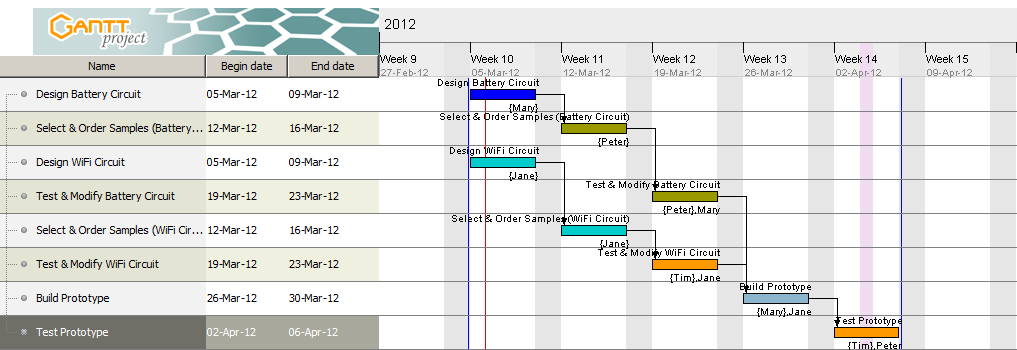
For a team project, resources information is often included to indicate which team member(s) in a team is responsible for a particular task or number of tasks. No matter whether it is an individual project, or a team project, in a Gantt chart you should find different bars representing the duration of the different tasks in the graph area, each indicated by a start and an end date. When a Gantt chart is used as part of a progress report for an ongoing project, you will also find the status of each individual item indicated on the horizontal connectors.
On a large project, it is quite common for some tasks to depend on the completion of one or more other tasks. In such cases, the dependencies are generally marked by an arrow connecting one task to another.
Look at the sample Gantt chart above and identify the different elements.
It is important to note that there is no single best way of constructing a project schedule. If you look at the examples provided on this page, you will notice that there are different types, serving different purposes. You need to choose whatever’s best for your own purposes on a particular project, and it may also be advisable for you to consult your supervisor to see if he/she has any particular preference.
Software
There are many different project management applications available that incorporate facilities for generating Gantt charts. The following table lists some freeware programs that offer standard project management features such as task and resource scheduling and tracking, charting, project and task breakdown into sub-projects, sub-tasks and dependencies.
| Software | Description |
|---|---|
| OpenProj | OpenProj is a Java-based open-source project management software similar to Microsoft Project. Can open existing MS Project files and is interoperable with Project, Gantt Charts and PERT charts. |
| GanttProject | GanttProject is a cross-platform desktop tool for project scheduling and management. It runs on Windows, Linux and MacOSX, is free, and its code is open source. |
| Gantter | Gantter is a free online management tool. Because it’s web-based, you don’t need to install any software on your hard drive for it to run, although, of course, you still need to have a web browser. Provides integration with GoogleDocs. |
We’ll be discussing some of the basic functionality of GanttProject in class. Then, based on your previous discussion, create a Gantt chart for the project/scenario you’ve been working on. Your Gantt chart should show the tasks and responsibilities of each individual member, the starting date/week and finishing date/week of each of the tasks.
A Brief Introduction to GanttProject
In GanttProject, you can easily create a flowchart of your project. This will generally include two major parts, a timeline that details the stages and/or milestones of the project, listed under the ‘Gantt’ tab, as well as a list of resources for the project, usually a list of people working on it, although it could also be a list of companies collaborating on a project. The latter is set up under the ‘Resources Chart’ tab.
The easiest way to set up a new stage (or ‘task’) is to use a right mouse-click inside the ‘Gantt’ tab window and choose ‘New task’ or simply press Ctrl+t. Once you’ve done this, you can name the stage, as well as change the start and end point, which is initially set to the day you create the task. To make changes to a ‘task’, you can select it and choose ‘Task Properties’ from the context menu or simply press Alt+Enter. Here, you can define whether the stage should be considered a ‘Milestone’, i.e. a major point in the project development, what the duration of the stage is, define a specific colour for the appearance of the bar representing the task in the chart, which ‘Resources’ are associated with it, whether there are any ‘Predecessors’, i.e. tasks that need to be completed before, etc.
On the ‘Resources Chart’ tab, you can add members of the project and assign roles to them by right-clicking in the window and choosing ‘New Resource’ or pressing Ctrl+h. As with the tasks, there are various properties you can add, such as the name of the Project member, telephone number, email, as well as their role. There are only two ‘pre-defined’ roles, ‘project manager’ and ‘undefined’, by default, but you can define further roles by selecting ‘Properties...’ from the ‘Project’ menu and adding new ‘Resource roles’. In the same window, you can also set the name of the project, add a description, etc., as well as choose specific calendar options, such as setting the start date, etc.
Under ‘Edit->Settings’, I’d suggest you set the language to English and change the date format to ‘MMM-dd-yyy’. You can also choose further display-related options, etc., from here.
Some Brief Notes on Project Managment
Although the above examples may make it seem like as if the timeline is the most important featuer of a project/scenario, of course this isn’t quite true. Other features, such as assigning appropriate roles and responsibilities, or doing enough research to be aware of all aspects of the scenario, are at least as important. For some scenarios, though, e.g. those where a company is answering an invitation for a bid, the timeline for the project contained in the proposal will probably end up playing a major role in the negotiations. In scenarios involving trade or pay negotiations, etc., it will initially probably only play a minor role, e.g. in that the negotiating parties will probably meet having a certain time frame in mind for completing the negotiations, and more concrete timelines for implementing any resolutions or policies will probably only be arising from the negotiations themselves, although, again, the individual parties must also consider these beforehand and be prepared to negotiate about these.